Object Detection with BuildShip's Google Vision API Template
Learn how to implement object detection in your workflows using the Google Vision API template on BuildShip.
Bringing Computer Vision to Serverless Workflows
Computer vision has rapidly become a core capability for modern software, enabling everything from automated inventory tracking and quality inspection to intelligent media moderation. However, traditionally integrating vision models into production applications required substantial infrastructure overhead: provisioning GPU or containerized backend servers, configuring Google Cloud service accounts and SDKs, parsing multi-part payloads, and calculating bounding box coordinate transforms.
While building templates and nodes at BuildShip, I wanted to bridge this gap. The goal was to provide an end-to-end, production-ready template that packages Google Cloud Vision's object localization into a visual, low-code workflow that any developer can remix and customize in minutes.
Architecture of the Google Vision Workflow
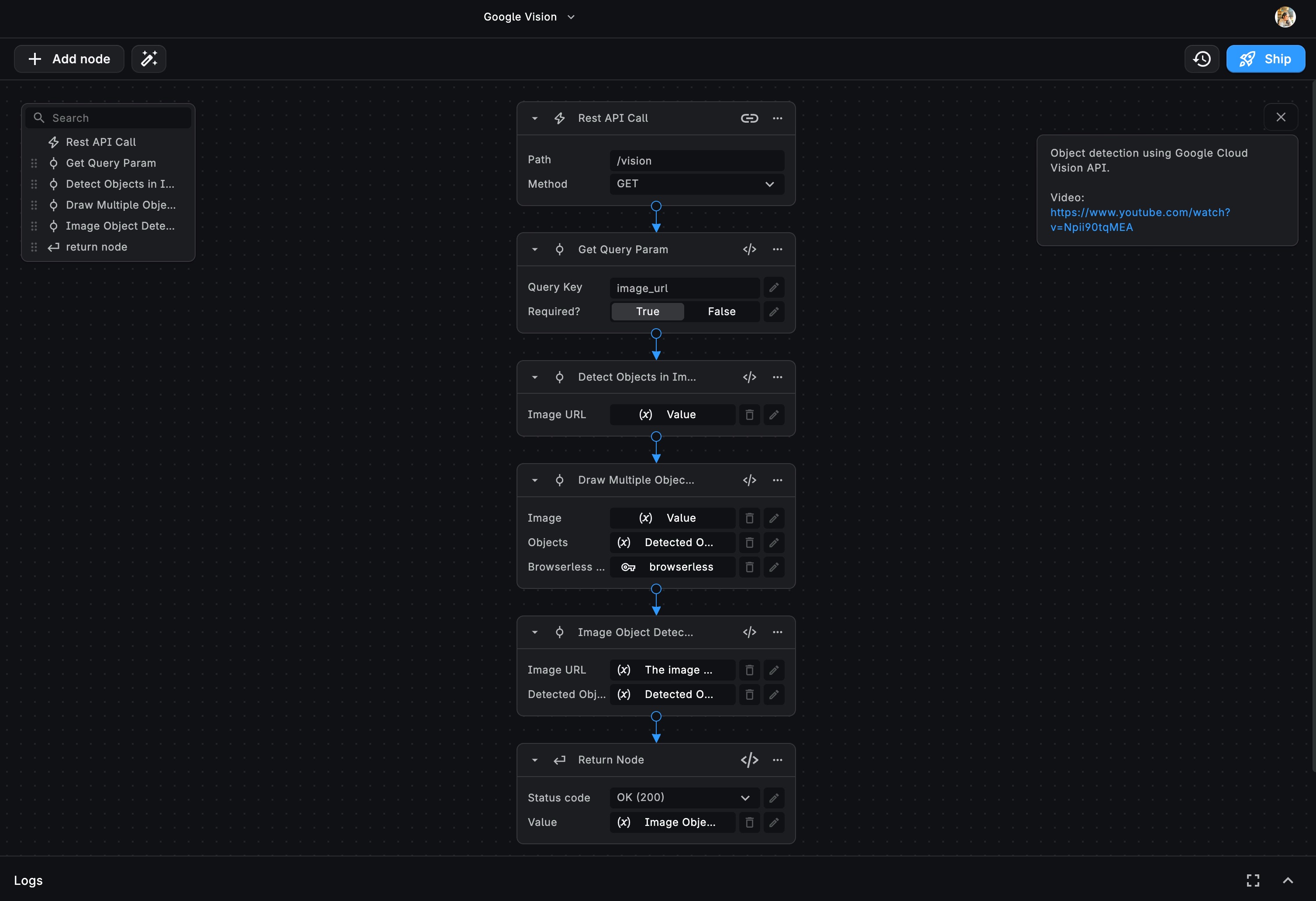
The template exposes an HTTP endpoint that ingests an image URL, analyzes its contents via Google Vision API, detects objects, and returns both structured JSON metadata and an annotated image with colored bounding boxes and labels.
Here is how the end-to-end pipeline operates:
- HTTP Trigger (
/detectobjects): The workflow starts with an incoming GET request that takes a query parameter,imageURL, pointing to the target image file. - Input Validation: The URL is validated to ensure it points to a reachable, supported image format (JPEG, PNG, WebP).
- Google Cloud Vision Node: The image URL is passed to BuildShip's Google Vision localization node. Under the hood, this makes an authenticated request to the Google Vision API, executing an
OBJECT_LOCALIZATIONfeature query. - Bounding Box Calculation: Google Vision returns a list of detected objects, each with a localized name, confidence score (
0.0to1.0), and normalized bounding polygon vertices. - Visual Annotation (Canvas / Headless Renderer): A downstream node computes the pixel coordinates from the normalized vertices and draws bounding boxes with category tags directly over the original image.
- API Response: The workflow responds with a clean JSON payload containing the detected entities along with the newly rendered annotated image asset.
Real-World Use Cases
Integrating object detection as an API endpoint unlocks immediate automation opportunities across industries:
- E-Commerce & Inventory Management: Automatically categorize items from warehouse cameras or seller product uploads, verifying that required items are present before listing.
- Smart Asset Tagging & DAM: Ingest thousands of marketing assets, automatically tag visible items (e.g., laptops, clothing, vehicles), and index them for rapid internal search.
- Security & Workplace Safety: Monitor facility imagery for required safety equipment like helmets and vests, triggering instant notifications when safety compliance standards are breached.
- Social & UGC Moderation: Detect prohibited items or inappropriate objects in user uploads before they are published to public feeds.
Handling Coordinate Normalization
A common gotcha when working with Google Vision API is handling coordinate geometry. Rather than returning absolute pixel values, Google Vision returns normalized vertices where $x$ and $y$ are floats between 0.0 and 1.0, representing the proportion of the image width and height.
By abstracting this coordinate transformation inside the workflow node, consumers of the template do not have to write custom canvas drawing logic. They simply pass an image URL and receive the annotated result ready for downstream consumers.
Extensibility & Composable Pipelines
The true power of this template lies in its composability. Because BuildShip connects visual triggers and nodes seamlessly, you can branch the workflow to:
- Store detected object tags directly in Firestore, Supabase, or Postgres.
- Trigger alerts in Slack or Discord if a specific item or anomaly is identified.
- Feed the detected labels into OpenAI or Claude to generate an automated descriptive summary of the scene.
You can inspect the full workflow and try out the template directly on BuildShip, or check out the original post on Medium.